
How was survival game, Oppidum, developed with accessibility in mind? We spoke to EP Games for more.
Hi everyone! We’re EP Games, the developer studio behind Oppidum – and we want to present to you its accessibility features, of which we are especially proud.
Oppidum is a narrative adventure with survival elements, designed to be enjoyed solo or with friends (up to four players). Picture this, you have just arrived at Insule – a mysterious land whose fate hangs in the balance! As you uncover its secrets, explore its landscapes, and make use of the vast array of resources the island offers, you will discover your role in Insule’s salvation.
And unlike many other survival games, the plot is a the centre of the gameplay experience! But what else makes this game really stand out, and why can’t the Safe In Our World team stop playing it?
Making new worlds more accessible
According to the developers, the accessibility in Oppidum has always been a priority. “Oppidum was built with some accessibility features in mind since it was mere bare bones,” says EP Games. “For example, given it is a narrative game, the quest markers have a deeper meaning in how to story evolves, and what kind of quests have been created.”
“Not everyone can manage to orient themselves in a new world or map, nor can they necessarily remember what NPCs they need to talk to. Some prefer the compass markers, some like markers on top of NPCs heads, and others prefer markers on the map.”

All options are available in the game, although the last one comes after some hours of gameplay, when you can actually have access to an enhanced map with a custom markers feature. You can mark a location using custom icons, to identify if you’ve found resources and materials, or simply that you’d like to return to explore properly when you’ve not got your head lost in a different quest.

Configuring game difficulty levels
Oppidum positions itself as a game within the survival genre that tries to include and accommodate as many audiences as possible. Everyone should be able to enjoy this genre! One way Oppidum stands out is by giving players the ability to configure their game to their own needs and preferences (physically and emotionally).
We added four different game difficulty levels, right from the very beginning of the development process.

More on sliders
A great example of giving more control to the player can be seen in the configurable difficulty settings – one of which removes player death entirely!
One difficulty level where players do not receive damage proved to be quite an amazing experience during our playtests for players who needed that feature.
The developers also allowed players to configure other sliders to reflect personal preferences: resources multiplier, aggro range, health recovery rate, and so on. One we personally appreciated was whether you lose your inventory on death (a big pet peeve in the Safe In Our World team).

Tweak accessibility as you go
When playing a new game (or a new genre of game) for the first time, you might not know what accessibility tweaks you need straight away. When players load into Oppidum, the pop up menu gives you some of the essentials to get started – like camera sensitivity for those with motion sickness, or single-press controls for those who struggle with their motor functions. But players can get back to any of these features from the menu, to adjust as they go!
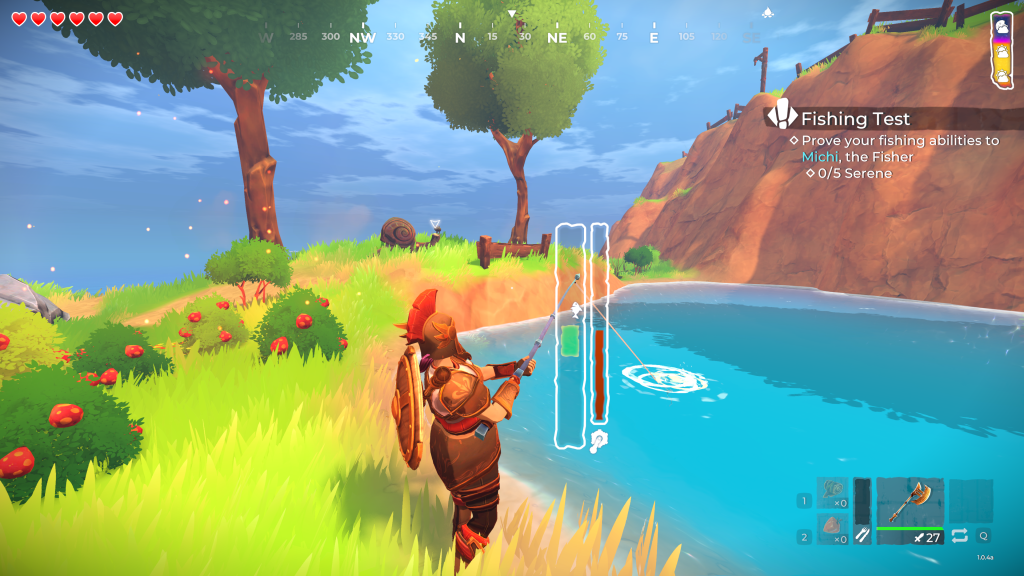
Focusing in one one of the many accessibility options, the Single-Press Controls not only helps players to build, but also FISH! Oppidum has a fishing mini-game (as it should), that requires the player to adjust to keep the green bar on the fish (classic). Now depending on your accessibility settings, you can tweak the difficulty of this mini-game. With single-press controls, you can simply press the button each time the fish moves, and the green back will jump to where the fish is. You do this every time the fish moves, with the green bar automatically tracking the fish, removing the need to keep pressing the button to adjust manually.
Likewise, the single-press controls helps when your character is running around. It removes the need to hold a button, instead giving you a toggle on/off feature with press of a button! This is great news for all those out there who have RSI (repetitive strain injury).
Prioritising player experience
The developers of Oppidum set out to make a game with accessibility in mind, and recognised that to do so, they had to think about the diversity of needs their players might have – the situations that they might be put in during the game, and the specific challenges they might face in those situations. By considering these angles from the very beginning of the development process, they were able to build a game where accessibility feels natural, and carefully designed to fit in the world they’ve created.
The reason behind adding so many accessibility options since the beginning was that we wanted to create an experience for as many people as possible, whoever they were, however they preferred to play.
One of the ways EP Games has considered ALL their players, has been through their game’s achievements – an often overlooked part of building an accessible gameplay experience! Players have celebrated Oppidum for not having achievements that depend on a specific difficulty level.
“The development of the achievements was carefully thought out, with players in mind, and not so much on one developer’s personal desires or beliefs,” says EP Games. “Because of that, when playing Oppidum, players will be unlocking achievements because they learned new features, completed certain collections, dared to face some challenges or progressed the story. Players don’t need to fight against themselves or against the game to win.”
I am a psychologist, as well as the producer in the team, and I could never have imagined a better and more beautiful way to join both worlds, while serving the society by creating an experience that could add a bit of joy to the lives of those who played it. And so, that’s how Oppidum was crafted.
To find out more about Oppidum, or any other projects from this developer, you can visit the EP Games website.