How to Create and Maintain Healthy Communities on Discord
Posted: 24 Oct 2024We hosted a master class as part of our Game Dev Champions event in partnership with Discord, which dives into how to create and maintain healthy spaces on Discord.
We’ve collated the key information and resources for all of our community to utilize when looking at taking care of their community and being a better digital citizen, including expert tips from the team at Discord themselves on keeping your community safe. This article also encompasses key safety policies already implemented by Discord to protect users, as well as guidance on bots, compromised accounts and more.
Discord Community Guidelines
The three main pillars within the Discord Community Guidelines are as follows:
Respect each other
Respect Discord
Follow the law
These pillars are broken down into subcategories which summarize unwelcome and non-tolerated behaviors within any Discord server, which include:
- No hate speech, bullying, harassment, extremism or abuse
- No doxxing
- No child sexual content
- No unwarranted sexually explicit content in any form
There is a full list available here which details the comprehensive guidelines.
User Controls
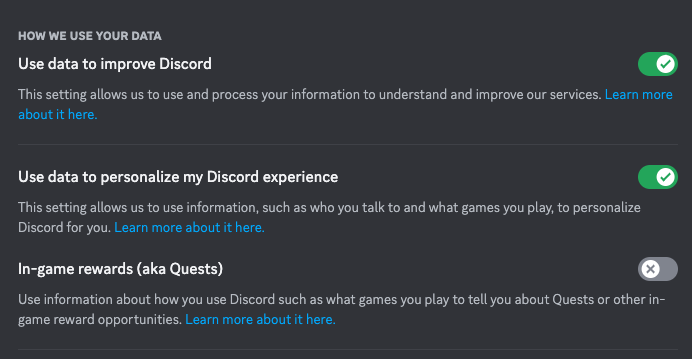
There are many ways for users to take control of their personal Discord experience, including features that protect user’s privacy, data collection and friend settings.
Blocking
Users are able to block other users, messages and tailor friend requests to meet their own needs.
There are detailed instructions here on blocking, allowing you to feel safe as you navigate online communities.
Friend Settings & Blocking Messages
You can control your privacy settings in the ‘Privacy & Safety’ tab in the User Settings in the bottom left corner.
By default, users can send you a direct message if you share a server with them. If you want to limit who can message you, this is where you can make that happen!
You can also block users directly from their profiles, by selecting the three dots in the top right corner when you pull up their profile.
You can also toggle how/if you receive friend requests on Discord in your User Settings – Friend Requests tab. This gives you full control on who (if anyone) can send you a friend request on Discord.
There are more detailed instructions on how to block users and messages here.
Muting
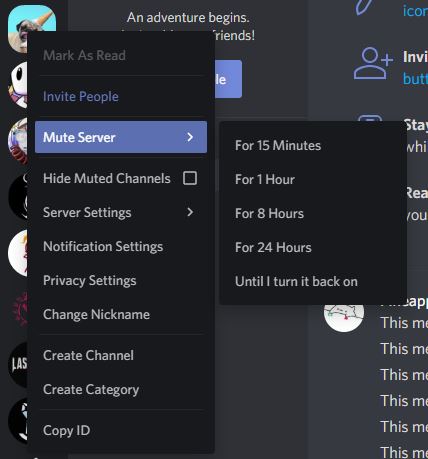
Notifications on Discord can get overwhelming, especially if you’re in a lot of different servers. There are two types of muting notifications; channel mutes and server-wide mutes.
You can silence an entire server by right clicking the server icon in your server list, and selecting ‘Mute Server’ in the drop-down menu.
If you just want to mute a select channel (or multiple) without losing notifications to the full server, you can toggle the specific channel and click the bell icon in the upper right-hand corner. The icon will change to confirm your choice, which you can choose to un-mute at any time.
If you want to mute community pings in Discord (e.g. @here or @everyone), you can do this by right clicking on the server icon in your server list, and selecting Suppress @everyone and @here or Role mentions on the Notification Settings tab.
Here are some more detailed instructions on muting.
AutoMod
Moderating a community can be a daunting task, but there are measures in place to help moderators keep their communities safe and healthy. AutoMod is a built-in tool designed to filter out unwanted content. This includes filters such as Keyword filters (which you can edit to your needs) which detect and block messages containing specific words or phrases that are unwanted in the community.
You can also block words in usernames or server nicknames in a similar fashion, by heading over to Server Settings and Safety Setup.
For detailed instructions on how to set up AutoMod, click here.
Teen Safety Assist
Discord servers can be a welcome retreat for many teens and young people from the world, but it’s important that there are tools to protect them when in Discord.
Safety alerts for users under 18 are automatically turned on by default, and includes features such as:
- alerts for messages from unknown senders
- auto-blurs sensitive media
- chat alerts prompting to block or report
This feature can also be enabled for any user on Discord if they wish to be more protected. See the Teen Charter here.
Warning System
The Warning System informs users of rule-breaking and account standing, and was put in place to give people opportunity to learn and grow as digital citizens on the platform.
This system consists of multiple touch points for users to understand any violations or community guideline breaches, and can help users modify their behavior to fit those guidelines, recognizing growth rather than just punishment.
Account Standing
This feature allows users to see their ‘account standing’ which is a summary of any violations and their current standing on the platform.
This feature shows the exact details of each violation – including the offending message – and which guideline it broke, allowing for users to learn from their mistakes.
Repeated violations will trigger stronger penalties, and limit accounts on the platform to protect other users. These limitations can be suspensions, either temporary or permanent. There is also an appeal process for users who may feel they have been unfairly punished.
This is not just for individual users, but also for Server Owners as well.
To learn more about the Discord Warning system and account standing, click here.
Building Community on Discord
Looking to create your own community? Discord has a number of helpful tips and tricks to get started and create a healthy online community. This includes instructions on how to customize and brand your server, get started as a server admin and build a thoughtful space online.
There are also pages in this resource looking at things like how to become a better moderator, and implement roles in your server.
Click here to learn more about the ins and outs of starting your own community journey here.
Building Games and More on Discord
That’s right, you can build games in Discord! Discord has a Software Developer Kit that enables their users to create in the platform, and publish for their communities to enjoy.
To learn more about building in Discord, click here.

Resources
Discord has a number of partnerships and resources available to its user base, from charity and non-profit collaborations to academia partnerships to improve user safety and experience.
Crisis Text Line
Discord have partnered with Crisis Text line to support people in mental health crisis in the US. If you need support, text DISCORD to 741741 to be connected with a live trained Crisis Counselor. You can find out more about what to expect when texting Crisis Text Line here.
Helplines
Discord have a list of free helplines and support with Throughline (which coincidentally is the same partner for the Safe In Our World helplines!) that you can access for over 130 countries.
Preventing Parasocial Relationships
Parasocial relationships can be described as one-sided relationships, that often occur between performers (e.g. Streamers, celebrities) and spectators (e.g. the audience or community), where the spectator develops a personal attachment to the performer without reciprocation or even awareness from the performer. Read this article about how to keep yourself safe from these relationships here.
Identifying & Avoiding Common Scams
Being able to spot common scams and compromised accounts is crucial to keeping yourself and your community safe from harm. This article details how to do this in more detail.
Discord Parent Hub
Discord have created a hub for parents looking to support their children in navigating and staying safe on Discord. Click here to learn more and access the hub.
